A pricing section is where a visitor decides whether to buy, so it deserves more care than most. In Bricks you can build a solid pricing table with native elements only, no add-ons needed. This guide shows the structure we use, what to put in each plan, and eight designs for different kinds of business.
The structure in Bricks
Build it from the outside in. Every part below is a native Bricks element.
- Section for the whole pricing area, with a background and vertical padding.
- Container inside it, set to your site’s content width.
- Heading and text at the top: a short promise, such as “Simple plans that grow with your team”, and one line on billing.
- Block for the card row. Set its display to grid with three columns and a gap. On tablet, change it to two columns (or one), and to one column on mobile.
- One block per plan card, each containing:
- plan name (Heading)
- price and billing period (Heading plus Text, so the period can be smaller)
- one-line description of who it is for
- feature list (List or Text with bullet points)
- button (Button element)
Style the first card, then duplicate it for the other plans so spacing and fonts stay identical. If you use classes, put the card styles on one class and add it to every card.
Highlight one plan
Most people pick the plan you make easiest to pick. Give your recommended plan:
- a different background or border colour
- a small badge such as “Most popular” (a Text element positioned at the top of the card)
- a filled button, while the other plans use outline buttons
Keep it to one highlighted plan. Two “recommended” plans cancel each other out.
Make it work on mobile
On phones, cards stack in one column. Put the recommended plan first on mobile using the order setting on its block, so visitors see it without scrolling past the cheapest plan. Check that buttons stay at least 44px tall and that feature lists do not get longer than the screen.
Write the plans before you design them
- Name plans by who they are for, such as Starter, Team and Business, not Plan A, B and C.
- Lead with the difference. Repeat shared features as “Everything in Starter, plus…”.
- Show the full price. Hidden fees kill trust. If tax is extra, say so under the price.
- Answer the main worry under the cards: free trial, cancel any time, or a refund window.
8 Bricks pricing section designs
Pricing looks very different across industries. These designs show how the same structure adapts:

SaaS three tiers. The classic three tiers with the middle plan highlighted. Works for most SaaS products.

Bistro set menus. Set menus instead of plans. Same card layout, but the content reads like a menu.

Clinic price list. A clear price list for treatments, with a side card for spreading the cost. Patients need clarity more than comparison.
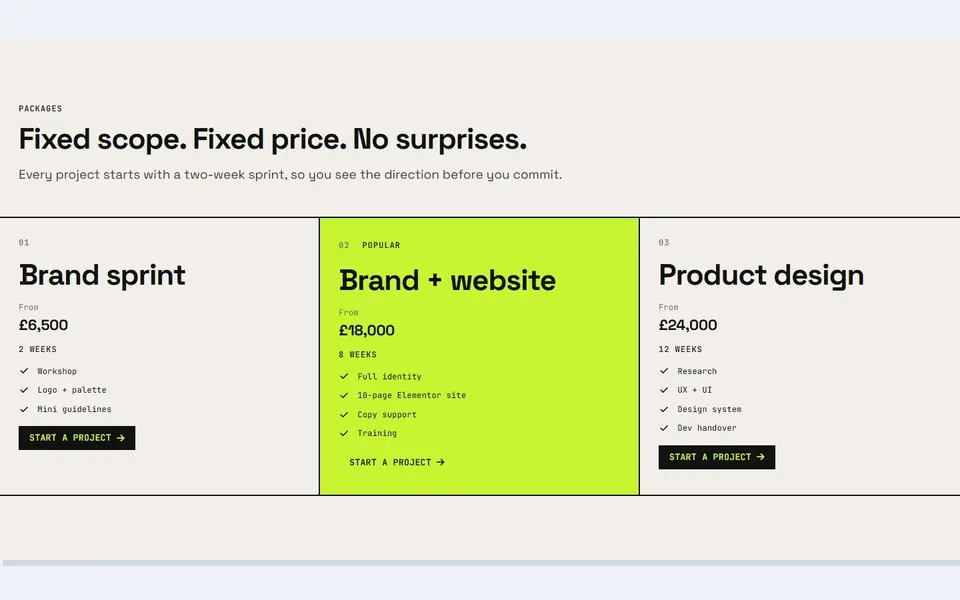
Studio packages. Fixed-price packages for a studio, so clients know the cost before the first call.

Gym memberships. Gym memberships that answer the biggest worries in the headline: no contract and no joining fee.

Hotel room rates. Room rates as an elegant list instead of cards, each row with its size, view, nightly price and a booking button.

Conference tickets. Conference ticket tiers with dates and what each ticket gets you.

Dealer finance examples. Car finance examples with the monthly price up front and every figure a buyer needs to compare.
Download pricing tables for Bricks
The first two designs (SaaS three tiers and Bistro set menus) are free. Get them from our free Bricks Builder templates. New to importing? Follow How to Import Bricks Builder Templates.
All 24 pricing designs are in the Bricks Pricing Sections kit for $19, built with native elements and ready for tablet and mobile.